
Operational Dashboard & Real-Time Pulse
Understand the KPI cards, 30-day workflow execution chart, and task status distribution on your Operational Dashboard (/dashboard).
While day-to-day delegation happens inside WhatsApp, the Founder Web Portal gives you a bird's-eye operational command center. When you sign in, you land on Dashboard (/dashboard)—your real-time pulse of company execution.
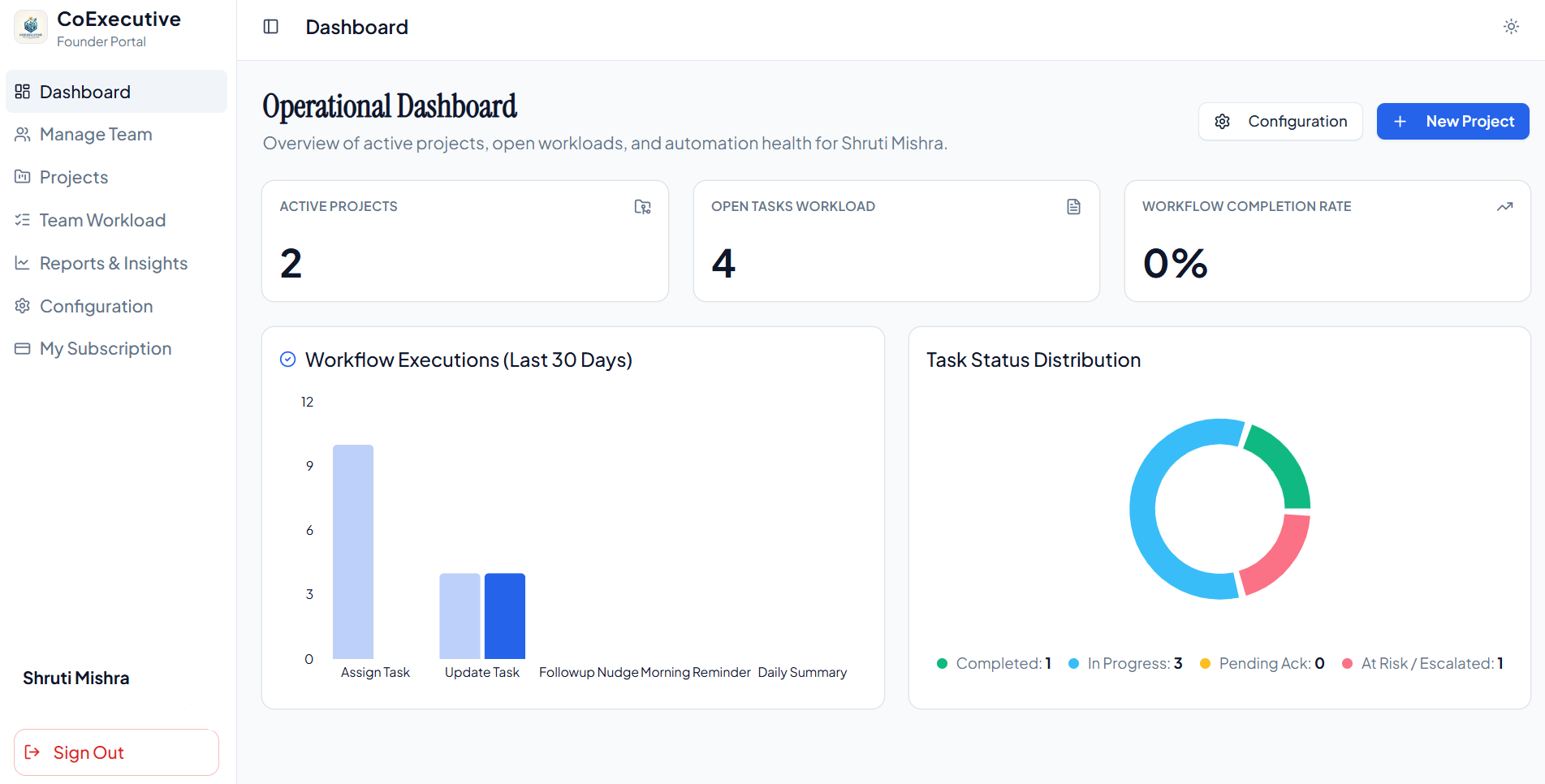
1. Top-Level Operational KPI Cards
At the top of Dashboard (/dashboard), three real-time summary cards show your current workspace load:
| Metric Card | What It Measures |
|---|---|
| Active Projects | Total count of currently active projects (including your default General project and any custom projects). |
| Open Workload | Total tasks currently open across your organization (excluding tasks marked Completed or Cancelled). |
| Automation Health / Executions | Total automated WhatsApp workflow executions over the last 30 days alongside your assignment completion rate. |
2. 30-Day Workflow Executions Chart
The Workflow Executions (Last 30 Days) bar chart visualizes the volume and completion of automated WhatsApp interactions handled by the CoExecutive WhatsApp Agent:
- Assign Task — Task assignment flows initiated and completed by the founder.
- Update Task — Status updates submitted by employees (
Done,Not Done,Blocked). - Followup Nudge — Scheduled check-in prompts dispatched to employees with active tasks.
- Morning Reminder — Scheduled start-of-day prompts delivered to the founder.
- Daily Summary — Scheduled evening executive summaries delivered to the founder.
3. Task Status Distribution Donut
Next to the workflow chart, the Task Status Distribution donut breaks down your workspace tasks into four color-coded buckets:
- 🟢 Completed: Tasks finished and marked Done.
- 🔵 In Progress: Tasks acknowledged or actively in progress that are within their deadline.
- 🟡 Pending Ack: Newly assigned tasks still awaiting employee acknowledgement.
- 🔴 At Risk / Escalated: Tasks that are Blocked, Escalated, or Overdue past their deadline.
4. Quick Navigation Sidebar
From the left sidebar (AppSidebar), you can jump between all seven modules of the Founder Web Portal:
- Dashboard (
/dashboard) - Manage Team (
/employees) - Projects (
/projects) - Team Workload (
/analytics) - Reports & Insights (
/reports) - Configuration (
/company-configurations) - My Subscription (
/subscription)
"Something Else": Relaying Requests & Undo Window
How employees can send general messages, questions, or leave requests to the founder—with a confirmation step and undo safety net.
Manage Team & Departments
Add, edit, bulk-import, or deactivate employees and organize departments on the Manage Team page (/employees).