
Assigning Tasks (Form & Multi-Slot Batching)
Delegate between 1 and 10 tasks in a single WhatsApp form submission using Menu Item 1 (Assign Tasks).
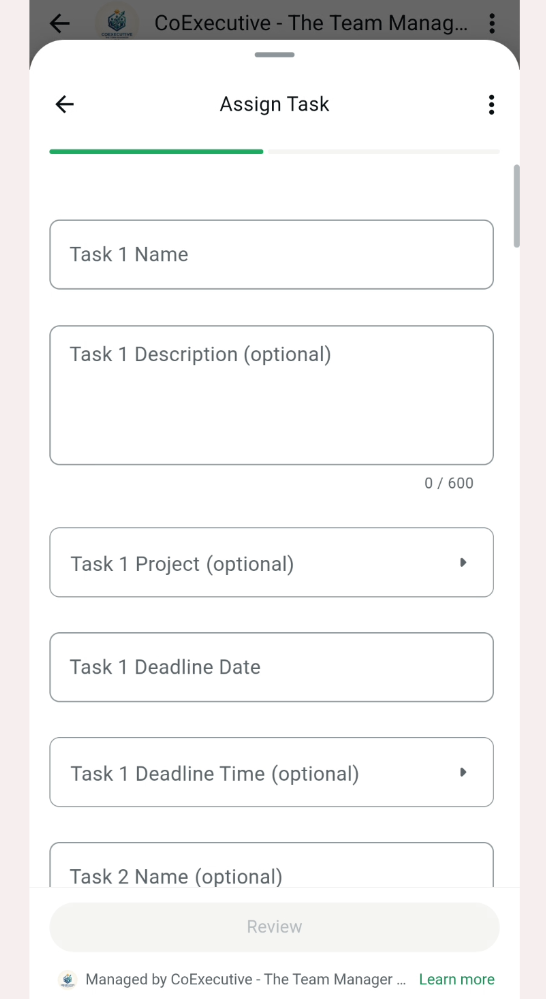
Menu Item 1️⃣ Assign Tasks is the fastest way to delegate structured work to your team without leaving WhatsApp. Instead of typing unstructured chat messages that can be forgotten or misinterpreted, you fill out an interactive WhatsApp form (BAS Flow Form) that guarantees every task has an owner, project, description, and deadline.

Walkthrough: Assigning Multiple Tasks Using the Interactive WhatsApp Form
How Multi-Slot Task Assignment Works
By default, your interactive WhatsApp task form displays 10 task slots (Slot 1 through Slot 10) so you can assign a single task or batch-assign up to ten tasks in one go.
- Blank Slots Are Ignored Automatically: If your form shows 10 slots and you only fill out Task Slot 1, simply tap Submit—slots 2 through 10 are automatically ignored.
- Configurable Slot Count (
1–10): You can adjust the number of task rows shown in the form anytime under Configuration → Task Slots per Assignment Form (/company-configurations).
Fields in Each Task Slot
For each task row you choose to fill out:
- Employee — Select any active team member from your Manage Team roster.
- Project — Defaults to
General, or select any active custom project in your workspace. - Task Description — Clear, actionable summary of the deliverable.
- Deadline (Date & Time) — When the task must be completed.
What Happens After You Tap Submit
1
Tap Open Task Form below to assign tasks to your team. Blank slots will be ignored automatically.
✅ 2 Tasks Assigned Successfully
1. Rahul Sharma (General) “Send revised commercial proposal to Apex Corp” 📅 Due: Today, 05:00 PM • Awaiting Acknowledgement
2. Priya Nair (Diwali Campaign) “Approve final print proofs with agency” 📅 Due: Tomorrow, 02:00 PM • Awaiting Acknowledgement
Automatic Employee Notification & Tracking
Each assignee receives an individual 1-on-1 message from the CoExecutive WhatsApp Agent with an Acknowledge button, and the tasks immediately start following your company's Acknowledgement Reminder Policy.